PDF to blog pipeline
The company's know-how lived in PDF brochures and technical documents. I built an automated assistant that turns each PDF into a first draft of a web article, so a person only has to review and edit it.
The short version
During my internship at PT SCADA PRIMA CIPTA, an industrial automation company, I built two connected things: the company's new website, and an automated workflow that writes first drafts of its articles from the PDF documents the company already had.
Drop a PDF into a shared folder, and the workflow leaves a structured draft in the website's content manager, matched to the right products and industries. Nothing goes live until an editor approves it.
Why it was needed
Companies that sell to other companies win customers with detail. A plant manager wants to know how a product works, where it fits, and who has used it before they ever pick up the phone.
Most of that detail already existed, in product brochures, proposals and catalogs saved as PDFs. Turning one of them into a web article by hand meant reading it, rewriting it for the web, filling in every field, and linking it to the right industries. Repeated for every document, it was slow, repetitive work.
How it works, step by step
The workflow runs in n8n, a tool for connecting apps and automating steps. Each step does one small job:
- A PDF is dropped into a shared Google Drive folder, which starts the workflow.
- The text is extracted and the key facts are pulled out into a structured format.
- An AI model, reached through OpenRouter, matches the document to the products and industries that already exist on the website.
- For each matching industry, the AI writes a draft article or case study in the exact shape the website expects.
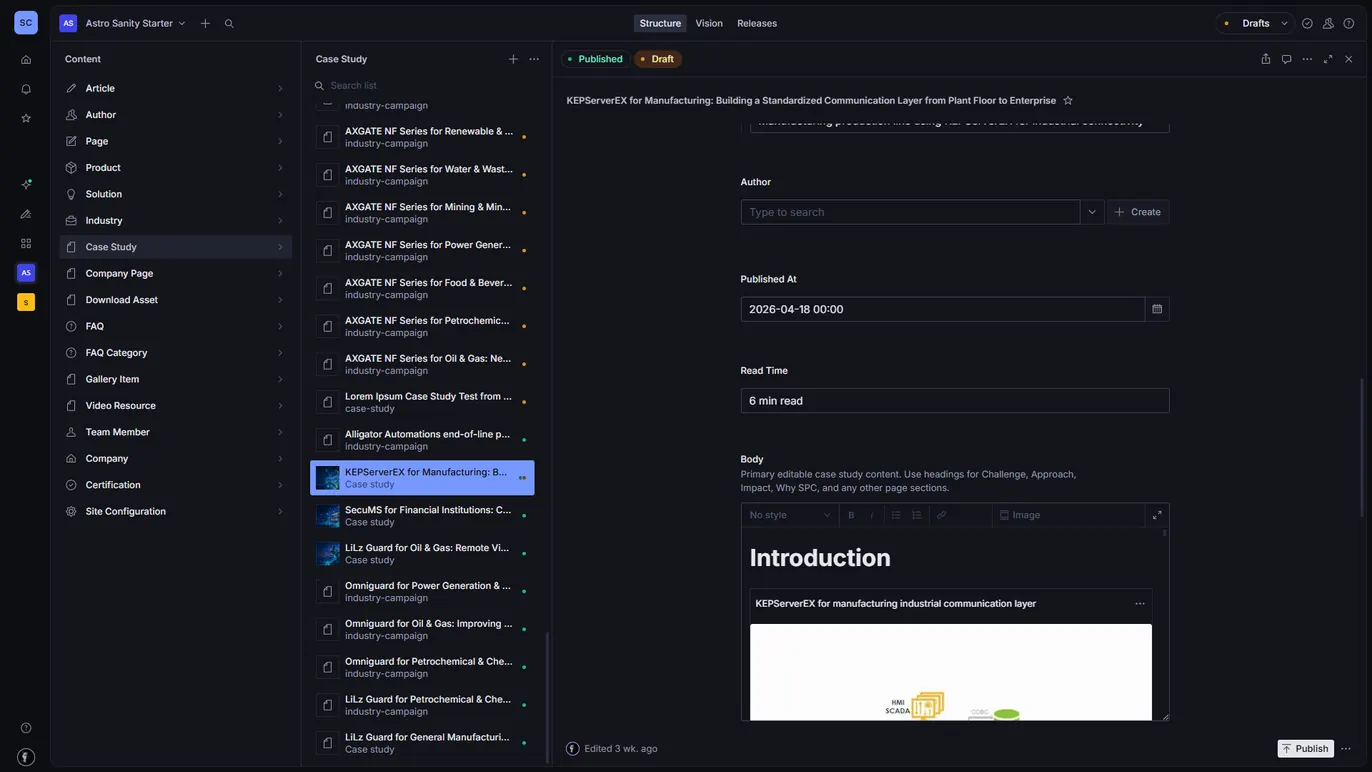
- The draft is checked so no required field is missing, then saved in Sanity, the content manager, as a draft.
- Every run is logged in a spreadsheet, and a file that fails is moved to its own folder so nothing disappears silently.
flowchart TD
  pdf[/"PDF in Google Drive"/] --> text["Extract the text"]
  text --> rewrite["Rewrite as a blog post<br/>OpenRouter"]
  rewrite --> match["Match to industries<br/>already on the site"]
  match --> check["Check every field is filled"]
  check --> draft[("Draft in Sanity")]
draft --> editor(["Editor reviews and publishes"])A person stays in charge
The goal was never to publish automatically. Editors open a draft that already has a title, a structure and the right industries attached, and their job moves from typing to checking: facts, tone, and when it goes live.
The website it feeds
The drafts land in the new company website, which I built at the same time. Non-technical staff manage every page from Sanity Studio: products, solutions, industries, articles, case studies, navigation and SEO details, without touching code.
- Astro builds the site as fast, static pages; Tailwind CSS handles the styling.
- Six content types reference each other, so a product page can list its related industries and case studies automatically.
- The contact form is protected from bots with Cloudflare Turnstile.
- The site, the Sanity Studio and supporting services run in Docker on a VPS behind a reverse proxy.
- A webhook that rebuilds the static site when content changes was designed; finishing and testing it, along with the contact form's email delivery, were open items when the internship ended.
Decisions and trade-offs
The choices that shaped it, and what each one cost.
- Drafts, never auto-publish. AI output about industrial products has to be checked by someone who knows them, so the pipeline stops at a draft and an editor decides what goes live.
- Choose from a list, don't generate one. The AI picks products and industries from the ones that already exist on the site, so every generated link points somewhere real.
- Several small prompts instead of one big one. Extraction, mapping and writing are separate steps with their own output checks, so a bad draft can be traced to the step that caused it.
- Log where people already look. Every run writes a row to a spreadsheet the team already uses, and failed files move to their own folder instead of disappearing.
- Static pages over a server. Company content changes rarely and is read often, so building static pages is faster and cheaper to host; the price is a rebuild step after each change.
For engineers
What the screenshots show, in technical terms.
- A Google Drive trigger starts the run; the extraction stage converts the PDF to text and the facts to JSON.
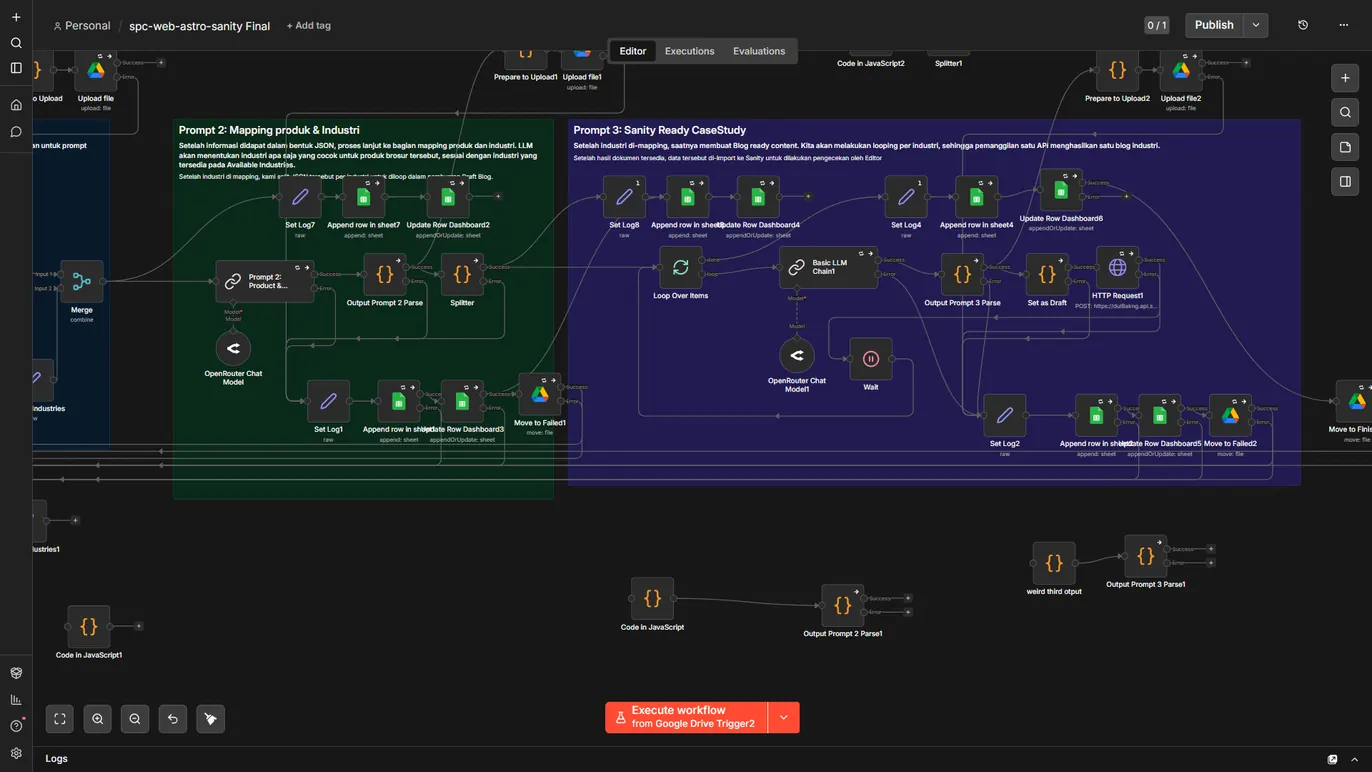
- Prompt 2 maps the document to existing products and industries (chosen from a list taken from the site, not free text), with output parsing and a failure branch.
- Prompt 3 loops over each mapped industry and produces one Sanity-ready document per industry through an LLM chain, with a wait step between calls.
- Results are written to Sanity through its HTTP API as drafts; each stage appends a row to a Google Sheets log and moves failed files to a separate folder.
What I would do next
The same points I left in the internship report: stronger validation of the AI drafts before they reach an editor, an editorial standard so articles share one structure and voice, and finishing the rebuild webhook and the contact form's email tests.
Screens
Sanity Studio Workflow 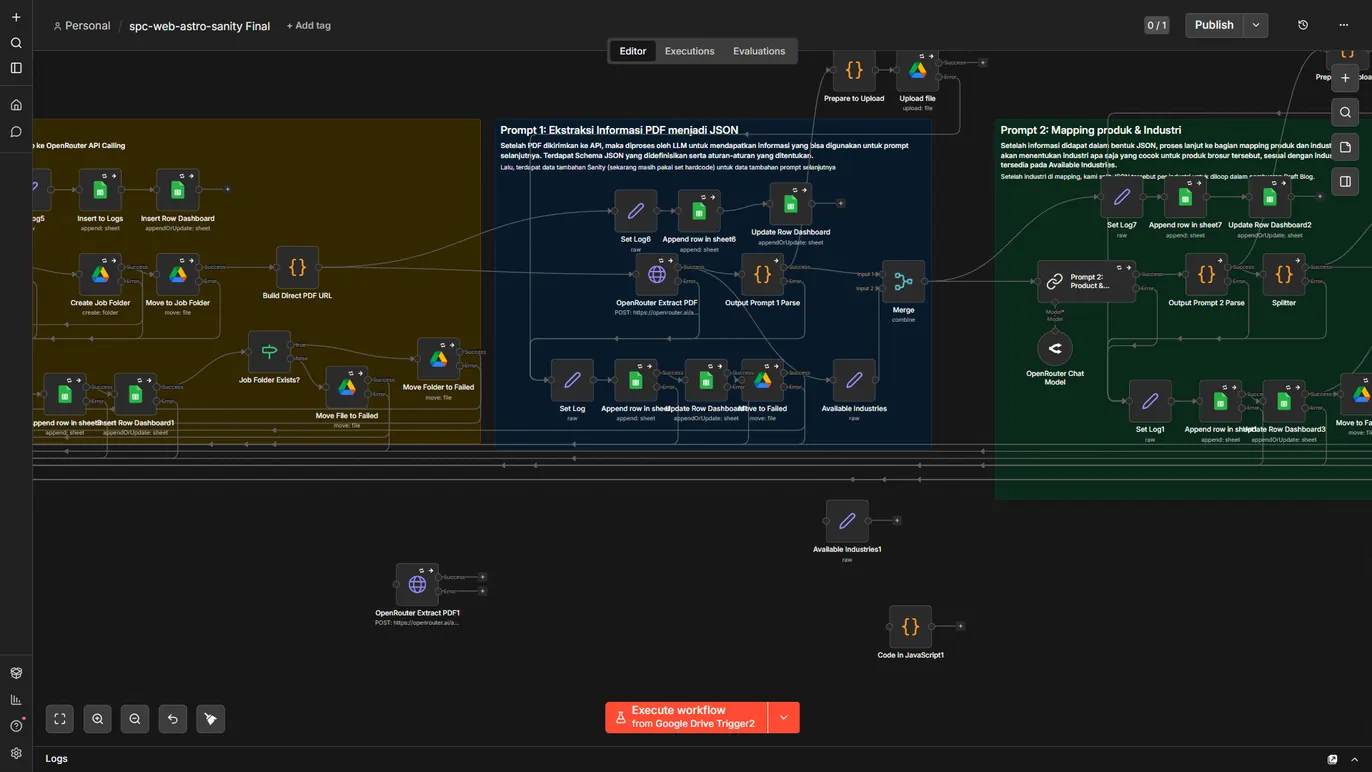
Extraction stage
What I took from it
Small steps beat one big prompt
Each step does one thing, so when a draft looks wrong it is easy to see which step caused it.
Choose from what already exists
Matching documents to the website's existing industries, instead of letting the AI invent new ones, kept every link valid.
The draft is the product
The point was to give an editor something worth editing, not to remove the editor.